
5 Remote Work Tool Stacks for Teams: The Australian SMB Guide

Managing remote teams for Australian small and medium-sized businesses (SMBs) requires tech stacks that streamline workflows while keeping data secure and compliant. The ideal remote work tech stacks are a combination of identity management, async collaboration, project tracking, and communication tools hosted within local Australian data centres.
According to market research by Microsoft and Dicker Data, nearly 65% of SMBs in Australia prefer integrated software suites over fragmented standalone tools to reduce operational costs and streamline remote team management.
Note for SMBs: Unless explicitly configured on higher or Enterprise tiers, standard plans for popular collaboration tools like Slack, Notion, and Google Workspace default to hosting your data on US or EU servers.
Key Takeaways from Empire Outsourced
- All-in-one suites save operational costs and streamline remote staff onboarding.
- Make sure your SaaS plans actually host your data in Australia.
- Keeping customer data onshore simplifies compliance under Australian Privacy Principle 8 (APP 8).
- Storing data in Sydney on a US-owned platform gives you local data residency, but foreign vendor laws (like the US CLOUD Act) can still apply.
How Remote Work Stacks Keep Your Data Stored in Australia
Remote work stacks keep your data stored in Australia by utilising localised cloud availability zones, such as AWS (Sydney/Melbourne) or Azure (Australia East), paired with administrative data pinning configurations.
When Australian SMBs subscribe to paid or enterprise SaaS tiers, administrators can enforce geographic data residency policies. This ensures primary customer databases, message histories, and file attachments remain strictly locked at rest within onshore Australian data centres.
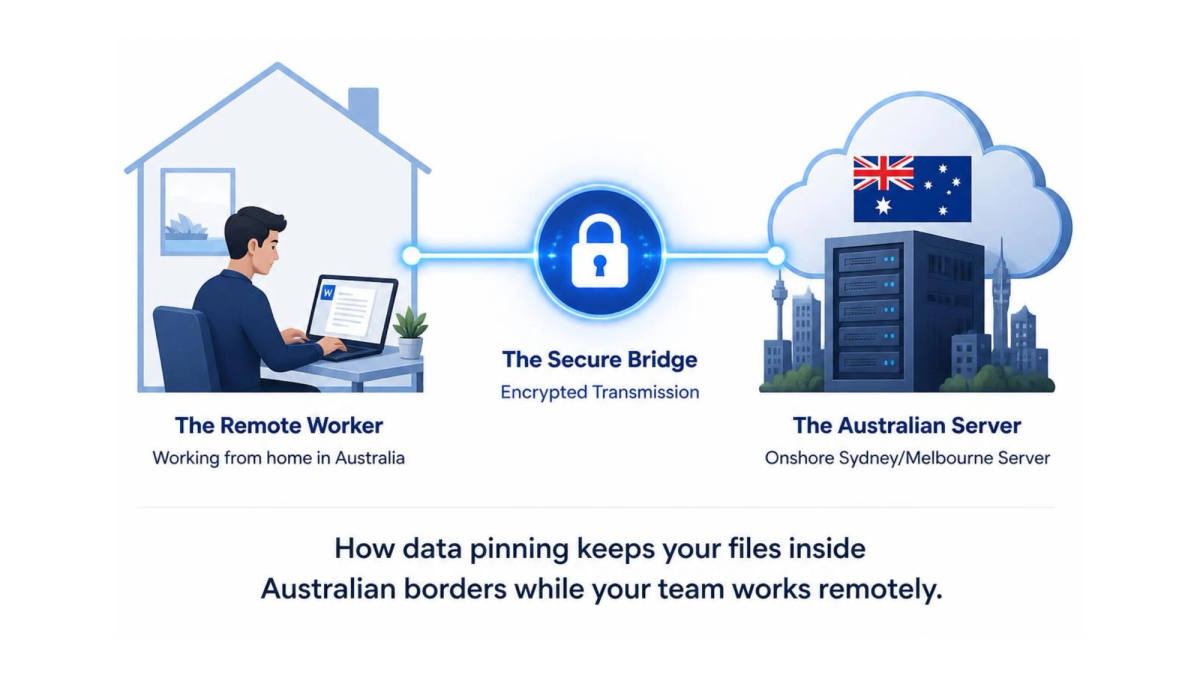
- SaaS Data Pinning: Platforms like Microsoft 365 and Azure Data Residency allow Australian tenants to restrict data at rest to local infrastructure.
- Regulatory Compliance: According to the Office of the Australian Information Commissioner (OAIC), data breach notifications under the Notifiable Data Breaches (NDB) scheme show that cyber-attacks and malicious activity account for the vast majority of reported incidents.
As regulatory penalties under the Australian Privacy Act continue to escalate, storing sensitive customer data locally within certified onshore infrastructure serves as a primary risk-mitigation strategy for distributed teams.
Top 5 Remote Work Stacks for Australian Teams
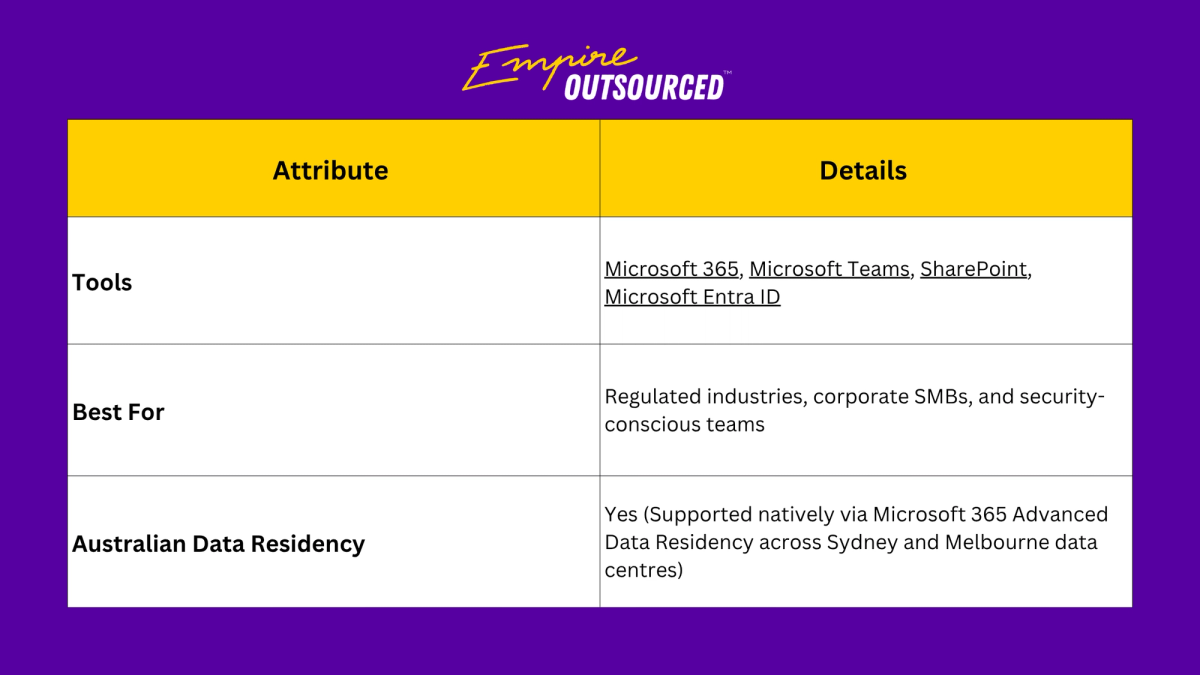
1. The Microsoft Ecosystem (All-in-One Enterprise and Security)
This stack handles everything from daily team chat to document sharing and device security. By keeping collaboration and access controls under one roof, it keeps your remote workflows smooth.
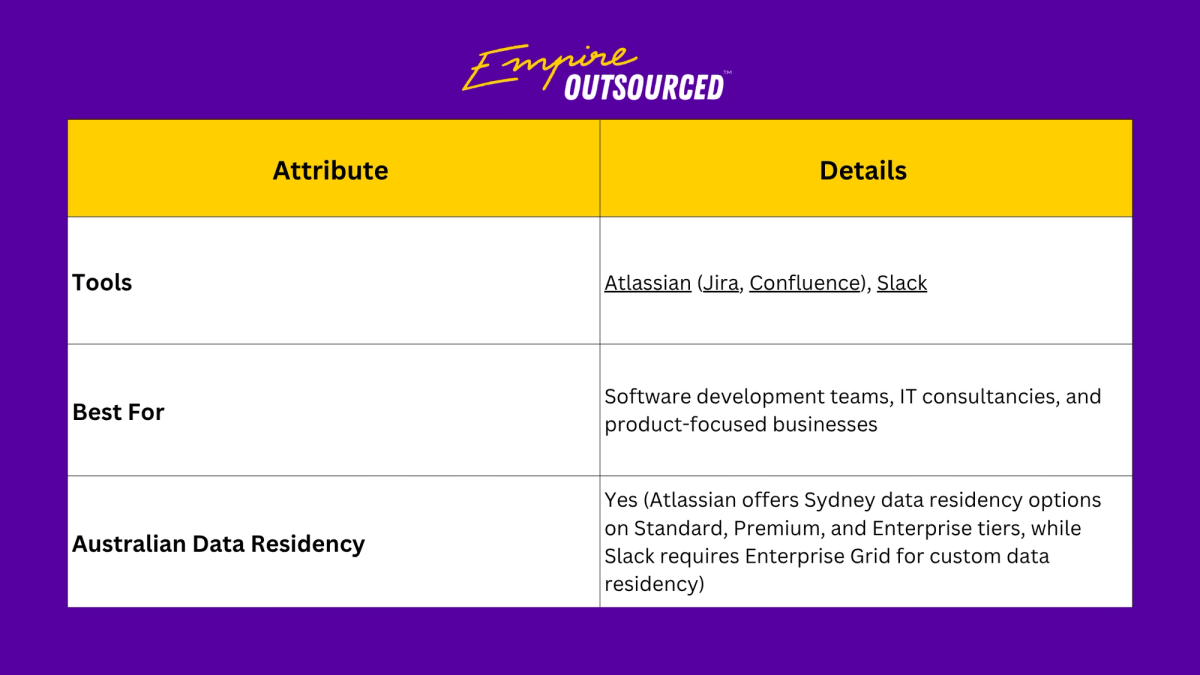
2. The Agile Tech and Engineering Stack (Atlassian + Slack)
Built for development teams and product-focused businesses who need to move fast. It plugs your project tracking right into your daily communication, keeping everyone in sync without the constant tab-switching fatigue.
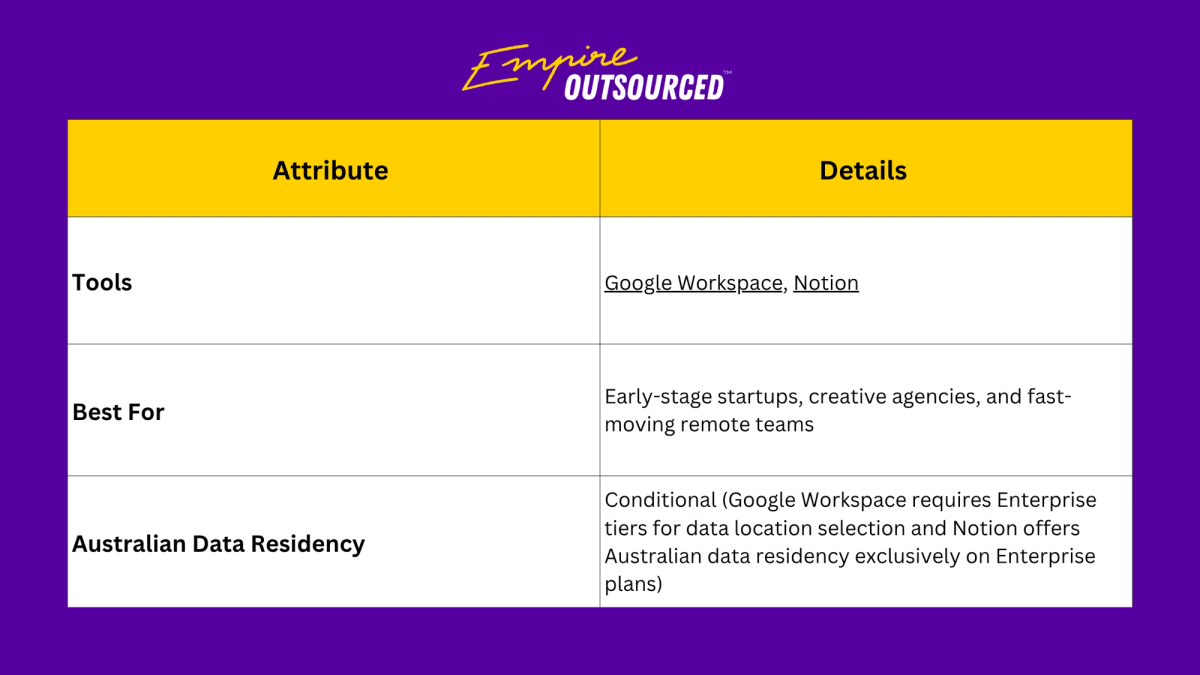
3. The Lean and Async Startup Stack (Google Workspace + Notion)
Designed for speed and minimal overhead, this combination emphasises asynchronous remote collaboration. It pairs Google's reliable cloud tools with Notion’s flexible workspace so your team can document, share, and collaborate.
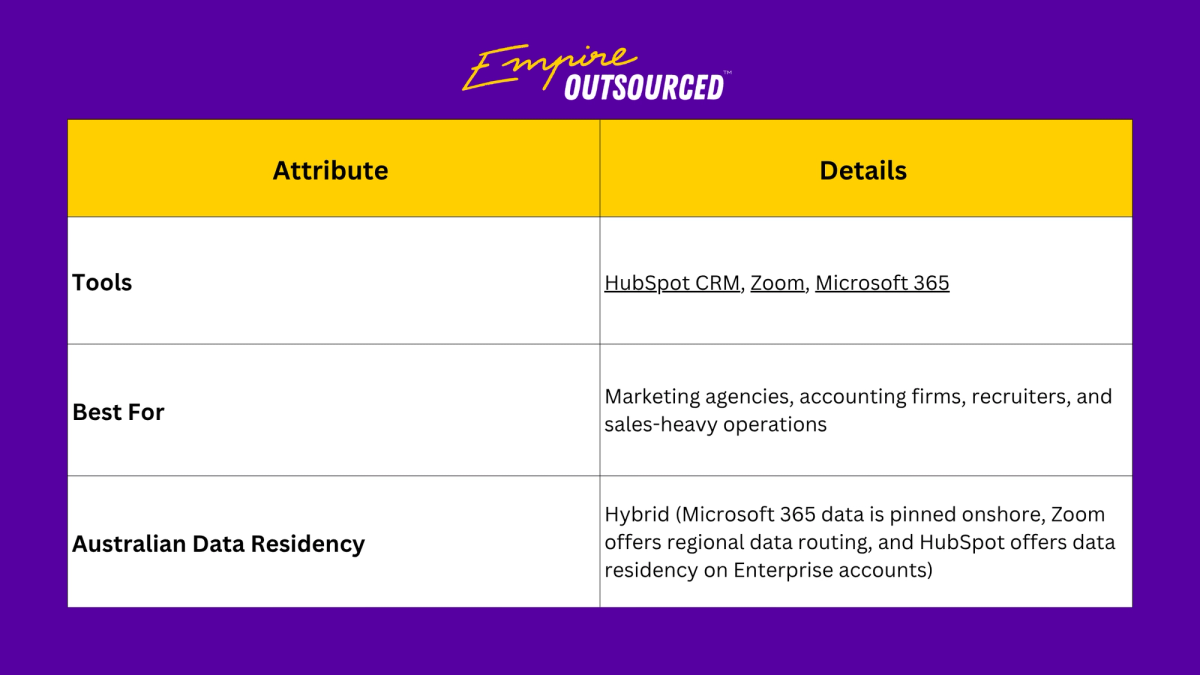
4. The Client-Facing Professional Services Stack (HubSpot + Zoom + Microsoft 365)
This stack connects your client meetings, CRM, and everyday productivity tools, so client communications flow seamlessly, all while keeping your back-office data secure.
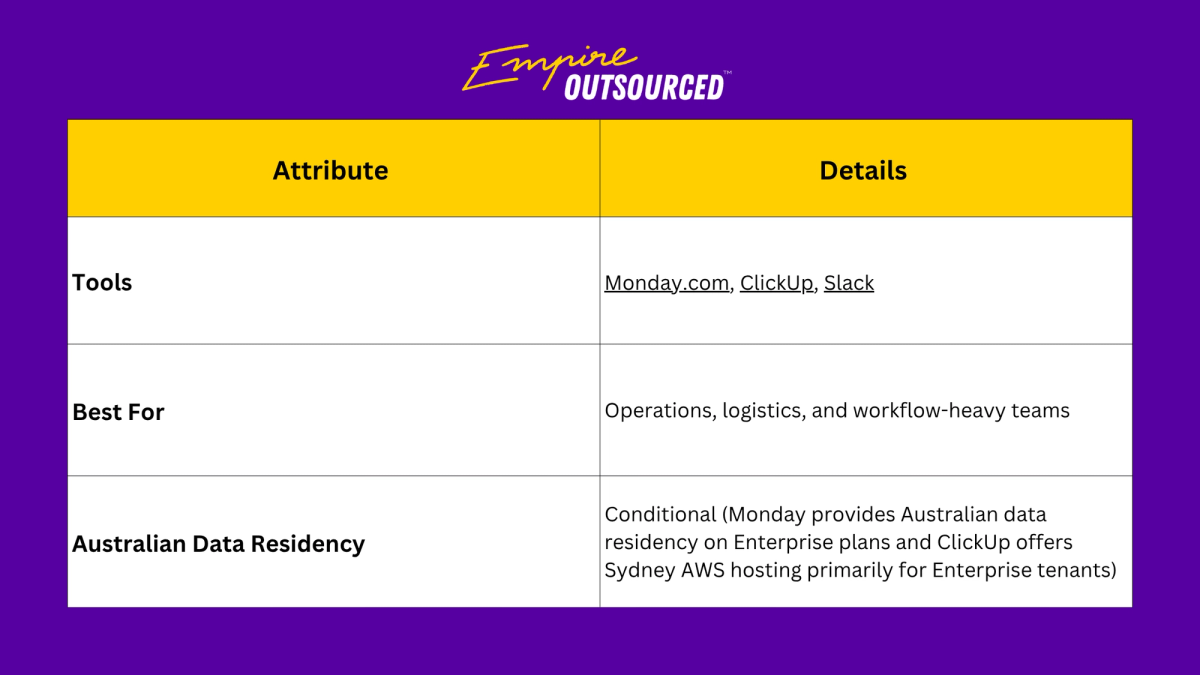
5. The Operational and Task-Heavy Stack (Monday + ClickUp + Slack)
For teams that live in custom workflows and automated tasks, this stack makes project management effortless. It provides high-visibility dashboards that keep everyone aligned and give leaders clear oversight without micromanaging.
Frequently Asked Questions
Is data stored in Australia by default on remote productivity tools?
No, most productivity tools do not store data in Australia by default. Global SaaS platforms typically default to U.S. or EU data centres unless the business selects a plan with regional data pinning or manually configures Australian data residency settings during initial tenant setup.
What is the difference between Australian Data Residency and Data Sovereignty?
- Data Residency is about where your data physically lives at rest (e.g., an AWS server located in Sydney or Melbourne).
- Data Sovereignty is about which country's laws govern that data.
How does the Privacy Act (APP 8) impact cross-border software tools?
APP 8 requires Australian organisations to take reasonable steps to ensure overseas software recipients do not breach local privacy laws.
Under Section 16C of the Privacy Act, an Australian business generally remains accountable for privacy breaches by overseas recipients unless specific exceptions apply (such as explicit user consent or substantially similar binding legal regimes overseas).
Manage Your Remote Team with the Ideal Tech Stack
Integrating these tech stacks into your business can save you time and give your remote team what they actually need to succeed. Book a free consultation with Empire Outsourced today to start delegating with a partner you can trust.